
AC 29-2C
Certification of Transport Category Rotorcraft
29-2C — Changes 1–9 incorporated (2023-06-23) Source checked 2026-11-28
Scope, source and reading notes
Transport category rotorcraft certification guidance under Part 29; consolidated FAA publication incorporating Changes 1 through 9. Base publication catalog date: 2008-09-30; latest included change: 2023-06-23.
Aerospace Consulting reference note: Broad Part 29 guidance covering transport rotorcraft design, flight, equipment, systems, and certification, including system safety and flight guidance.
The complete selected publication is available in reading text and as the original PDF. Reading text is extracted from the official PDF; page layout is simplified, and figures and tables should be checked in the original page view.
Search covers extracted text. Words contained only in graphics may not be searchable. The original publication is available below.
Official source recordOriginal PDF on this siteSource: FAA. Reproduced with source acknowledgment; source edition and status are shown above. SHA-256: c57691386dd1e59263633bd8fdaabb842a958061a9b6a82d30dad18358977013
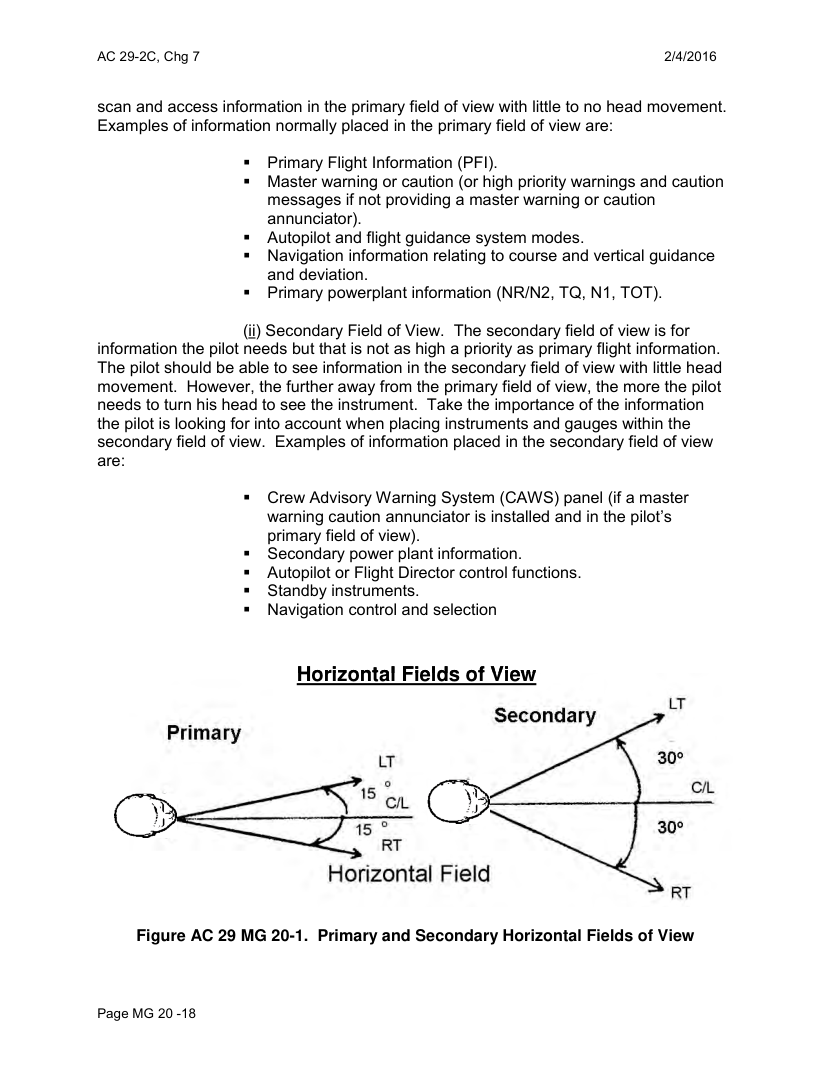
scan and access information in the primary field of view with little to no head movement. Examples of information normally placed in the primary field of view are:
• Primary Flight Information (PFI). • Master warning or caution (or high priority warnings and caution messages if not providing a master warning or caution annunciator). • Autopilot and flight guidance system modes. • Navigation information relating to course and vertical guidance and deviation. • Primary powerplant information (NR/N2, TQ, N1, TOT).
(ii) Secondary Field of View. The secondary field of view is for information the pilot needs but that is not as high a priority as primary flight information. The pilot should be able to see information in the secondary field of view with little head movement. However, the further away from the primary field of view, the more the pilot needs to turn his head to see the instrument. Take the importance of the information the pilot is looking for into account when placing instruments and gauges within the secondary field of view. Examples of information placed in the secondary field of view are:
• Crew Advisory Warning System (CAWS) panel (if a master warning caution annunciator is installed and in the pilot’s primary field of view). • Secondary power plant information. • Autopilot or Flight Director control functions. • Standby instruments. • Navigation control and selection
Horizontal Fields of View Horizontal Fields of View
Secondary LT
Primary
30°
LT
C/L
-----,r:~15 ° ---- C/L 15 ° RT Horizontal Field
Figure AC 29 MG 20-1. Primary and Secondary Horizontal Fields of View
View figures, tables and original page layout
Connected references
Source-backed citations and subject-based engineering context are labelled separately. These links do not establish equivalence or project acceptance.
Related technical context
Engineering contextEvidence and scope
AC 27-1B and AC 29-2C — published scope
Aerospace Consulting navigation suggestion based on the subject and stated scope of the two publications.
This connection does not establish regulatory equivalence, acceptance of a newer edition, or applicability of a project-specific precedent to another programme.
Supporting sourceRelated technical context
Engineering contextEvidence and scope
CS-29 and AC 29-2C — published scope
Aerospace Consulting navigation suggestion based on the subject and stated scope of the two publications.
This connection does not establish regulatory equivalence, acceptance of a newer edition, or applicability of a project-specific precedent to another programme.
Supporting source